
To hide aspect lines connected to the Ascendant, Descendant, Midheaven and IC, set chart_config.show_angle_aspects to false. Keep show_aspect_lines set to true if you still want planet-to-planet aspects in the center of the chart.
{
  "chart_config": {
    "show_aspect_lines": true,
    "show_angle_aspects": false
  }
}
This changes the rendered SVG only. It does not remove the angles, their axes, their labels or the calculated aspect data returned by astrology calculation endpoints.
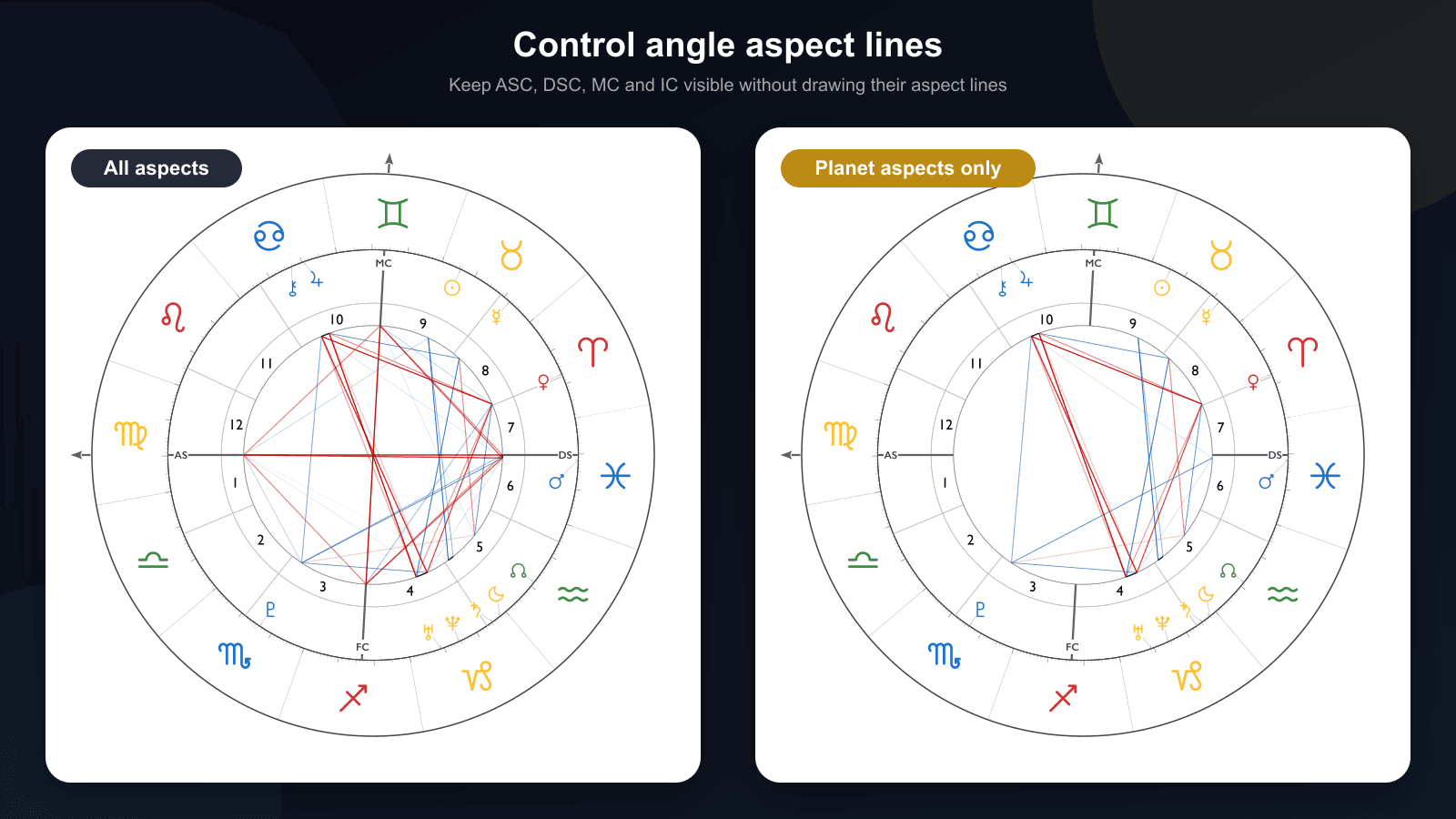
What show_angle_aspects controls
An angle aspect is any rendered aspect with ASC, DSC, MC or IC as one of its two endpoints. Turning the option off removes both angle-to-planet and angle-to-angle lines. It also removes the matching aspect degree ticks, so the sign ring does not retain tick marks for lines that are no longer visible.
The following chart elements are not removed:
- Planet-to-planet aspect lines
- ASC–DSC and MC–IC axes
- Angle labels such as ASC, DSC, MC and IC
- French-style AS, DS, MC and FC labels
- French arrow markers
- Houses, signs, planets and connector lines
- Aspect data calculated outside the SVG renderer
The default is true, which preserves the previous chart appearance for existing integrations.
Before: all planet and angle aspects
With show_angle_aspects: true, the renderer includes every enabled aspect line. In the example below, several lines terminate at the four chart angles.
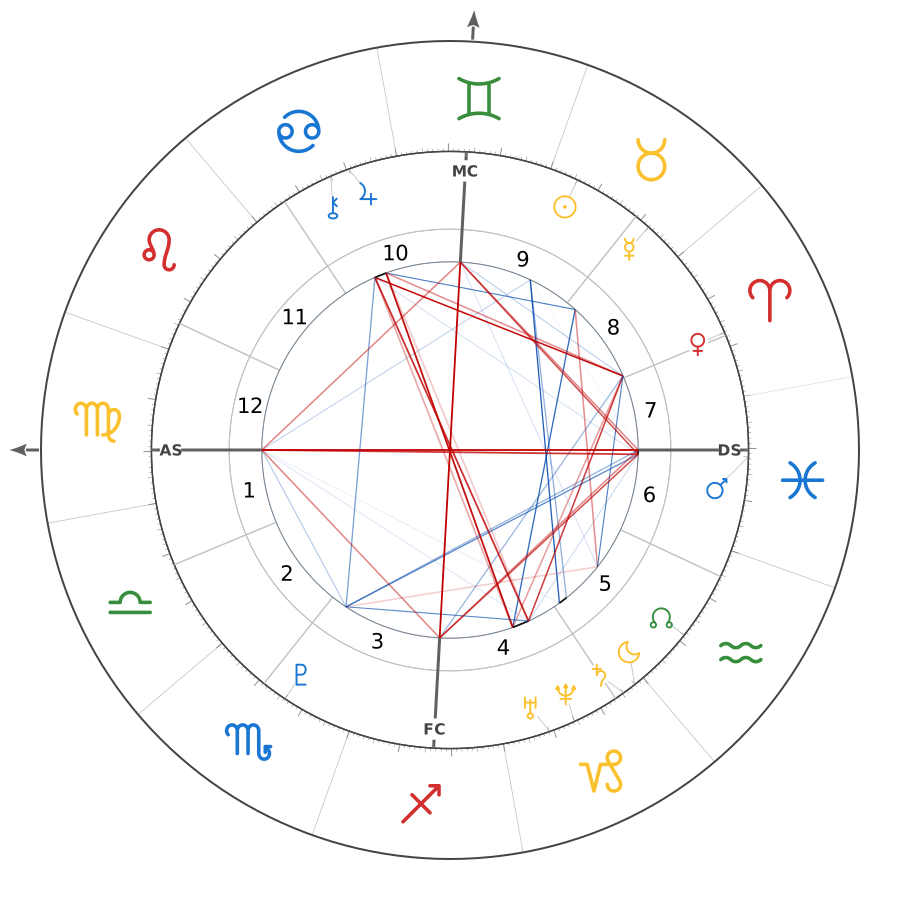
This mode is useful when angular aspects are part of the visual interpretation. It can become dense in charts with wider aspect orbs or many enabled points.
After: planet-to-planet aspects only
With show_angle_aspects: false, the same chart keeps its angle axes and labels but removes every aspect line involving ASC, DSC, MC or IC.
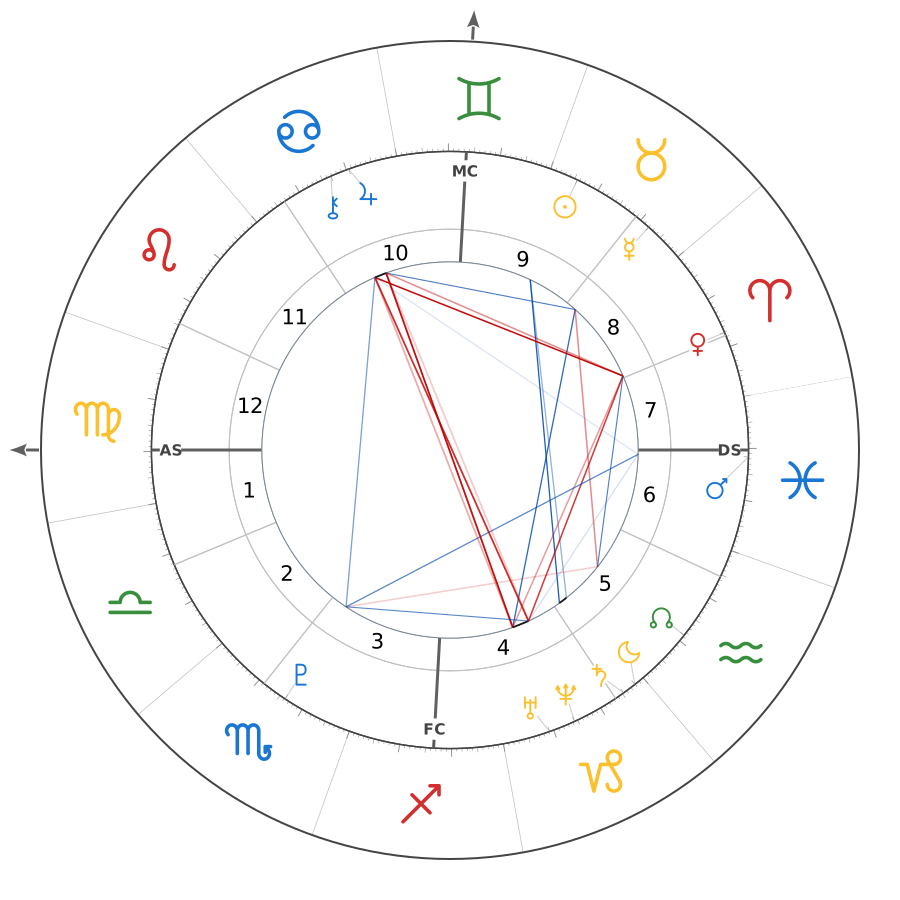
The result gives the planetary aspect pattern more space without turning the aspect layer off completely. For the sample charts in this guide, the setting reduces the visible aspect-line count from 42 to 23 while leaving the birth data and chart geometry unchanged.
Use the setting in the Chart Designer
You can configure the option without editing JSON by hand:
- Open the Western Chart Designer.
- Select the Chart inspector tab.
- Open Aspect Lines.
- Leave Aspect lines enabled.
- Turn off Angle aspects (ASC/DSC/MC/IC).
- Copy the generated request JSON or download the finished chart.
The setting search also recognizes phrases such as “hide aspects between angles and planets.” This is useful when the inspector is open but the correct section is not immediately visible.
Complete natal SVG API request
The following request generates an SVG chart with planet aspects enabled and angle aspects hidden. Replace YOUR_API_KEY with your FreeAstroAPI key.
curl -X POST "https://api.freeastroapi.com/api/v1/natal/chart/" \
  -H "Content-Type: application/json" \
  -H "x-api-key: YOUR_API_KEY" \
  -d '{
    "name": "Example chart",
    "year": 1990,
    "month": 5,
    "day": 15,
    "hour": 14,
    "minute": 30,
    "time_known": true,
    "city": "London",
    "lat": 51.5074,
    "lng": -0.1278,
    "tz_str": "Europe/London",
    "house_system": "placidus",
    "zodiac_type": "tropical",
    "format": "svg",
    "size": 900,
    "display_settings": {
      "asc": true,
      "dsc": true,
      "mc": true,
      "ic": true
    },
    "chart_config": {
      "show_aspect_lines": true,
      "show_angle_aspects": false,
      "show_angle_labels": true
    }
  }'
The response body is the SVG document. You can return it directly from your backend, save it as an asset or sanitize and embed it according to your application’s security policy.
See the natal SVG chart endpoint documentation for the full request schema, color controls, chart geometry settings and output options.
JavaScript example
The same configuration works in a browser or Node.js application when the API call is made from a secure server route. Do not expose a production API key in client-side code.
const response = await fetch(
  "https://api.freeastroapi.com/api/v1/natal/chart/",
  {
    method: "POST",
    headers: {
      "Content-Type": "application/json",
      "x-api-key": process.env.FREEASTROAPI_KEY,
    },
    body: JSON.stringify({
      name: "Example chart",
      year: 1990,
      month: 5,
      day: 15,
      hour: 14,
      minute: 30,
      time_known: true,
      city: "London",
      lat: 51.5074,
      lng: -0.1278,
      tz_str: "Europe/London",
      house_system: "placidus",
      zodiac_type: "tropical",
      format: "svg",
      chart_config: {
        show_aspect_lines: true,
        show_angle_aspects: false,
        show_angle_labels: true,
      },
    }),
  },
);

if (!response.ok) {
  throw new Error(`Chart request failed: ${response.status}`);
}

const svg = await response.text();
Related visibility settings
These options control different parts of the chart and can be combined.
| Setting | Result |
|---|---|
show_aspect_lines: false | Hides all ordinary aspect lines and their degree ticks. |
show_angle_aspects: false | Hides only aspects involving ASC, DSC, MC or IC. |
show_angle_labels: false | Hides angle text or glyph labels but does not filter aspect lines by itself. |
show_aspect_symbols: false | Hides midpoint aspect glyphs while leaving enabled lines visible. |
show_planet_connectors: false | Hides planet-to-ring connector lines, not aspects. |
If both show_aspect_lines and show_angle_aspects are false, the broader show_aspect_lines setting wins and no ordinary aspect lines are rendered.
When should you hide angle aspect lines?
This option is most useful when you need a cleaner chart at smaller sizes. It works well for mobile reports, chart thumbnails, social cards and interfaces where the planetary aspect pattern is the main visual subject.
Keep angle aspects enabled when the product explicitly interprets angularity or when users expect to inspect aspects to the Ascendant and Midheaven directly from the wheel. The best default depends on whether the chart is intended for detailed study or compact presentation.
For a broader explanation of conjunctions, oppositions, trines, squares and sextiles, read Understanding Astrological Aspects for Developers.
Frequently asked questions
Does this hide the Ascendant or Midheaven?
No. The ASC, DSC, MC and IC axes and enabled labels remain visible. Only aspect lines and aspect degree ticks involving those angles are filtered.
Does it change the calculated natal aspects?
No. show_angle_aspects is a renderer setting. It changes the SVG presentation without mutating the calculated chart data.
Can I hide only ASC aspects and keep MC aspects?
The current option treats ASC, DSC, MC and IC as one group. It does not provide separate per-angle switches.
Does it work with transit, synastry and composite SVG charts?
Yes. The chart configuration uses the shared aspect-line renderer, so the same option applies when those SVG endpoints render aspects involving chart angles.
What happens when the birth time is unknown?
An untimed chart does not have reliable houses or angles. In that case there are no valid ASC, DSC, MC or IC aspect lines to filter. Read the birth chart without birth time guide for the fields that remain reliable.